> ## Documentation Index
> Fetch the complete documentation index at: https://learn.polymarket.com/llms.txt
> Use this file to discover all available pages before exploring further.
# Deposit USDC on Ethereum
> How to deposit USDC on the Ethereum Network to your Polymarket account.
Depositing USDC on the Ethereum network to Polymarket will automatically bridge your funds to the Polygon network.
1. On the Polymarket deposit page, under “Other Methods,” click **USDC (ETH)**.
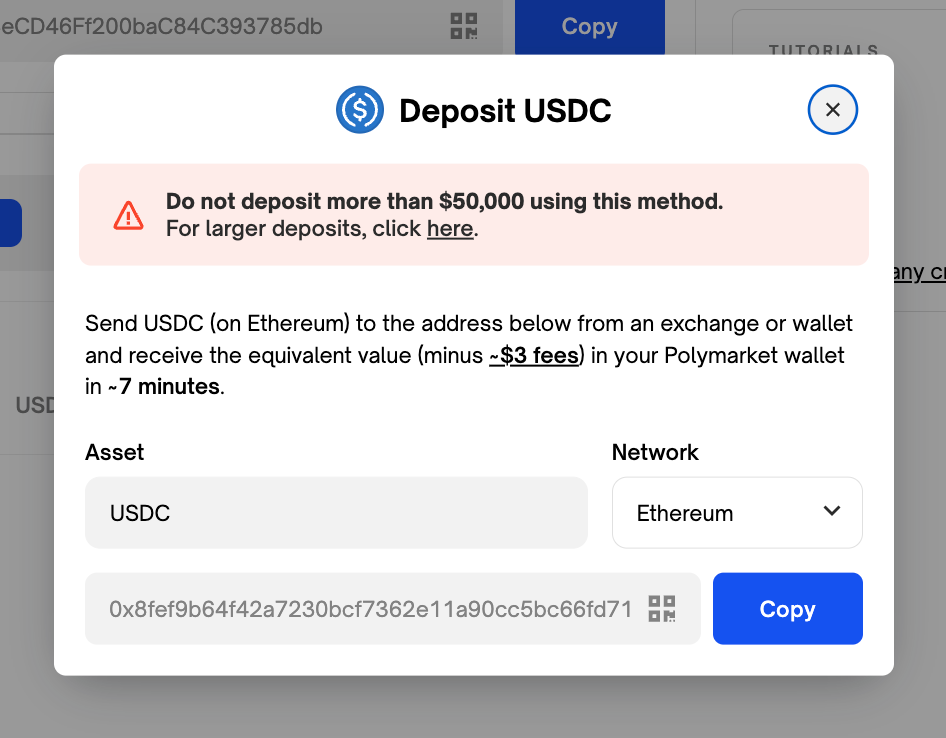
2. Copy your unique USDC (ETH) deposit address.
3. Send your USDC to the address you just copied on the Ethereum network. This feature is typically called “send” or “withdraw” on most exchanges and wallets.
Ensure you are sending USDC to your Polymarket Ethereum deposit address on Ethereum network to avoid any issues.
4. Once your deposit is detected, a countdown timer will begin.
5. You will see "Deposit Complete" when your funds are ready to trade.
If your countdown timer resets more than once, or if you encounter any issues, please reach out to support on [Discord](https://discord.com/invite/polymarket).
 3. Send your USDC to the address you just copied on the Ethereum network. This feature is typically called “send” or “withdraw” on most exchanges and wallets.